Startup Screen
Startup Screen
Startup Screen
|
Menu:
|
File  Startup Screen Startup Screen
|
The Startup Screen will appear each time you start the software program. The Startup Screen will allow you to create a new drawing file, select from an existing list of drawing templates, or open an existing drawing file. In addition, you can access a list of training tutorials and find information on the software.
When running the software for the first time on the computer, a message may appear from the virus protection software installed on the computer asking if you want to allow the software access to the Internet. The Pro Contractor Studio software requires access to the Internet to link to online training videos and to display information about the software in the Community Channel Update and Development Update areas. The following illustration is a message generated by the McAfee Security Center software.
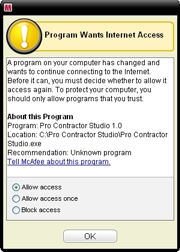
Example allow access anti-virus protection window
To access the information and updates available online, you will need to allow the software access to the Internet from your computer system.
To start a new drawing file:
-
Under New Drawing, click on New Custom Drawing to begin creating a new drawing file or click on a template file name to create a new drawing from an existing template.
To open an existing drawing file:
-
Under Open Drawing, click on Open Existing Drawing to open a drawing already saved to a drive, or click on a file name in the list of the last four previously opened drawing files.
To access an online training tutorials:
-
Under Getting Started, click on the link to the training topic of your choice. These tutorials require Internet access.
Note:
Back to All Topics