Insert Title Block
Insert Title Block
Insert Title Block
|
Menu:
|
Draw  Insert Title Block Insert Title Block
|
|
Toolbar Icon:
|

|
The Insert Title Block command will allow you to place a title block on a design page. A title block is an important part of any technical drawing including landscape and irrigation designs. Title blocks contain the necessary information required to identify a drawing.
Although the information contained in a title block may vary depending on the project and the use of the drawing, the following is a list of standard information included in a typical title block:
Although a title block could be located any where on the sheet of paper, title blocks are most often located along the bottom edge, lower right corner, or down the entire right side of the drawing page.
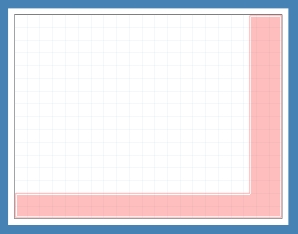
Red area indicates the preferred title block locations.
To place a title block on a sheet:
-
Select the location of the title block from the Orientation drop down menu by clicking on the selection one time with the left mouse button.
-
Select the title block to place on the drawing page by clicking on the name of the drawing from the Title Block drop down menu.
-
Click on the Insert button to automatically place the title block on the drawing page in the selected location.
-
If the title block drawing contains preset Attribute ID's, the information for each Attribute ID will appear under the Title Block Attributes header.
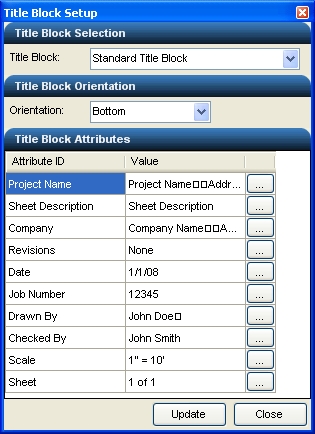
List of existing title block Attribute ID's.
-
Click on an attribute editor  button to open the editor window.
-
Adjust the text as necessary and click on the OK button to update the text associated with the title block attribute.
-
Once the title block is on the page, you can adjust the Orientation setting and click on the Update button to relocate the title block on the page.
Note:
-
You can set text Attribute ID's within a title block drawing using the Text command.
-
The original title block drawings are saved in the ...\Pro Contractor Studio\Symbols\Title Block folder.
-
You can create your own title block symbols. Title block symbols should be drawn horizontally on the page even if you intend to insert them vertically on the design. Set all margins for title block drawings to zero (0). Title block drawings must be set to a width of 100 units. The lower left corner of the title block drawing must be set to the X and Y coordinate position of 0,0. All entities in the title block drawing must be located on layer 0 in the Layer Manager. Title block symbols may contain an image file of a company logo.
Back to All Topics