Drainage Options
Drainage Options
Drainage Options
Menu: |
Tools
 Options Drainage Options Drainage |
The Drainage tab will allow
you to adjust settings that are common to drainage design.
To set the drainage preferences:
Click on the Drainage
tab.
In the Symbol Scale
Factors area, type in the desired factor
in the text box associated with each different type of symbol. This
scale factor setting will increase or decrease the size of the symbols
when they are placed on the design screen. To increase or decrease
the size of existing symbols on the design, enter the Symbol Scale
Factors and click on the Apply
button.
In the Drainage Pipe
Linestyle Settings area, click on the Pipe
Line Style drop down menu
and click on a line style name.
Select the desired line style from the drop down list to assign
to all drainage pipe on the design.
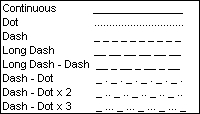
Available drainage pipe line styles
Enter a default thickness or width for the drainage pipe in the Pipe Line Thickness text box.
In the Pipe Line
Scale text box, type in the desired scale setting for the drainage
pipe. Depending on the output scale of the design or the size
of the design screen, it may be necessary to adjust the line type
scale or distance between the dashes forming the drainage pipe. For
example, if you print or plot a design at a 1" = 30' scale, the
dashes forming the pipe may be so close together that the line appears
to be a solid line rather than a dashed line. It is recommended
that you draw a piece of drainage pipe on the screen and print the
drawing at the desired scale to determine what setting is best for
your project.
To adjust the line style and scale setting of the existing drainage
pipe on the design, enter or select the values and click on the Apply button.
Click on the Close
button to exit the dialog box.
Note:
The color for each drainage pipe selection is set
in the Drainage Pipe command.
You can change the line type, width and scale of the
Drainage Pipe layer in the
Layer Manager as well as the
Drainage Options dialog box.
The drainage symbol scale factors will automatically
increase or decrease in size based on the output Scale
setting in the Drawing Page Setup
command.
Back to All Topics