Angular Dimension
Angular Dimension
Angular Dimension
Menu: |
Draw
 Angular Dimension Angular Dimension |
Toolbar Icon: |

|
The Angular Dimension command
will allow you to measure the angle between two lines. The lines
cannot be parallel to each other. The dimension line arc will span
the angle between the two lines. If the dimension line arc does
not intersect one or both of the lines being dimensioned, the program
will draw one or two extension lines to intersect the dimension line arc.
To draw an angular dimension:
Select the Angular
Dimension command from the Draw
menu or click on the toolbar icon.
Set a base point location or origin from which to
dimension the two lines.
Click on the start angle (line one).
- Drag the mouse to
the desired location for the dimension text and click a third point
to complete the command.
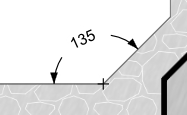
Angular dimension
Notes:
You can set values for all dimension parts and the
color assignments in the Options command
on the Dimensions tab.
Use the Radius Dimension
to dimension an arc.
Select the Display
Format and Precision
in the Options command on
the General tab.
Back to All Topics