Pro Contractor Studio Knowledge Base
Curve
|
Menu: |
Draw |
|
Shortcut Key: |
C |
|
Toolbar Icon: |
|
 Curve
Curve
The Curve command will allow you to draw a curve made up of three or more points on the design screen. Before drawing a curve, make sure you have chosen the correct layer assignment.
To draw a curve:
-
Click one time with the left mouse button to set a point for the beginning of a curve. The Anchor Point will be set at the beginning point location.
-
Move the cursor to a new location. The angle and distance from the Anchor Point will be shown in the Status Bar at the bottom of the screen. Click one time with the left mouse button to set a second point.
-
Move the cursor to another location and click to set a third point creating a curve.
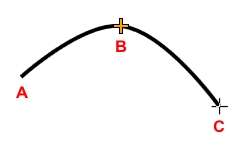
Start point A, second point B, and third point C. -
Continue the process by setting additional point locations as necessary.
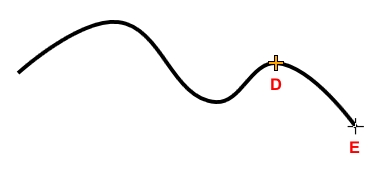
Continue drawing a curve with points D and E. -
Press the Enter key to end the curve.
Note:
-
You can press the Esc key to back up and remove points set for the curve.
-
If the Polar Angle is turned on, the curve will "snap" to preset angles based on the Polar Angle setting.
-
The Anchor Point
 will move to the location of the last point set on the screen. The distance and angle from the Anchor Point location is shown in the Status Bar at the bottom of the screen.
 -
You can add, delete or move points or grip locations on a selected curve.